What are SharePoint Site Mailboxes?
The SharePoint Site Mailbox concept is aimed at bringing Exchange emails and SharePoint documents together. So how does it do this?
The SharePoint Interface
A site mailbox can be created at a site level (maximum of 1 mailbox per site). From a navigation point of view the mailbox appears just as though it is another list or library in the SharePoint site.

When you click on the Mailbox link things aren’t as nice and integrated as you would hope. Instead of showing the content of the mailbox within the SharePoint site, as you would the content from a Document Library or List, rather the link simply opens the Site Mailbox in Outlook Web Access. You are taken away from SharePoint to see the content of the Site Mailbox.

This now starts to give you an understanding of what’s happening under the covers. When you add a Site Mailbox to a SharePoint site, you are effectively creating a mailbox on the Exchange server and then your site gets a link placed on it.
What is nice, is that the security of the mailbox is tied to the security permissions of your SharePoint site. So if you add or remove a user from your SharePoint site, the appropriate permissions are granted/revoked from the mailbox in Exchange as well.
Unfortunately this is about the extent of the integration of email and documents that you get through the SharePoint user interface, fortunately things will get a lot nicer when we look at things from the Outlook client…
The Outlook Interface
Outlook 2013 has been enhanced to support SharePoint Site Mailboxes. A really nice integration point is the automated rollout of Site Mailboxes directly to your Outlook profile based on your permissions to the SharePoint site. What this means is that if you are an owner or member of a SharePoint site and a Site Mailbox is created, that Site Mailbox will automatically get added to Outlook (even while Outlook is running). If your membership to the site is removed then the mailbox is automatically removed from Outlook as well. The Site Mailbox is represented in Outlook as a new store per site. All this talk of Site Mailboxes is a bit misleading though, because what you are actually getting in Outlook is the Document Libraries from the SharePoint site, not just the mailbox. What do I mean? lets have a look graphically at what you are getting:
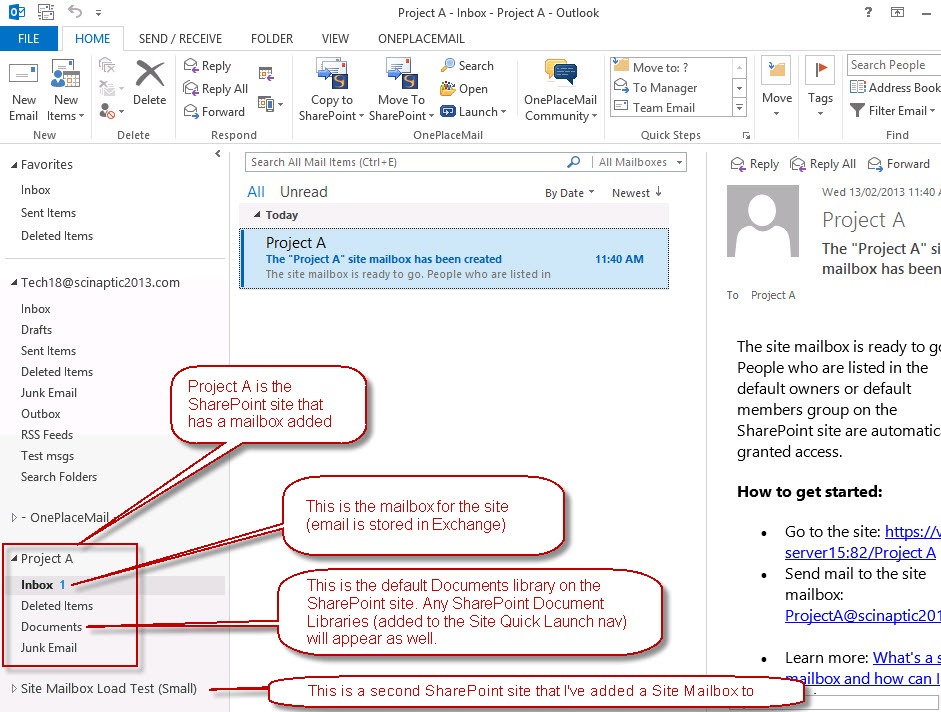
When viewing the content of a Site Mailbox, the view presented is the same format and appearance as any other mail folder as shown below:
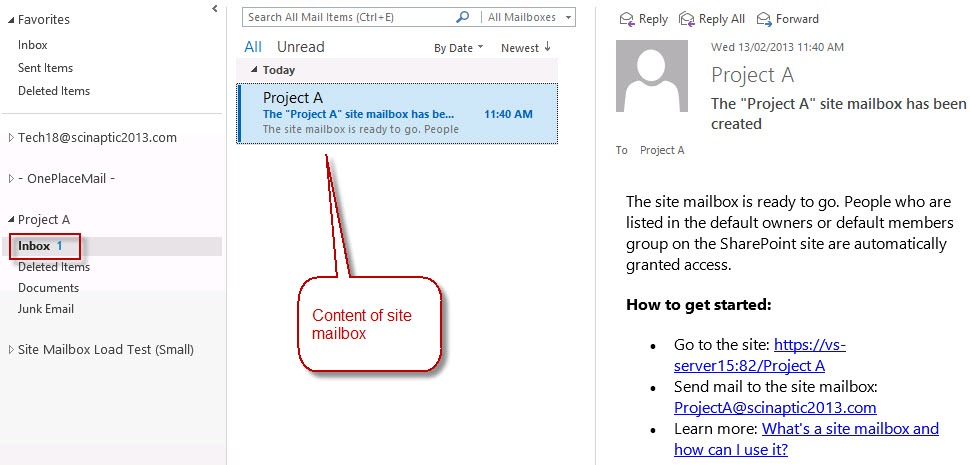
When viewing SharePoint Document Libraries you see an Outlook view of all the items in the document library as shown below:

This is pretty cool. Exchange and SharePoint perform a synchronization to make this possible and stubs (not the actual file content) is stored in Exchange to make this view possible. Clicking on these items in the Outlook view to open them up then communicates directly to SharePoint to download and open the file.
Subfolders, both within the mailbox and within document libraries are supported.
Read more about what Microsoft has to say on SharePoint Site Mailboxes.
Pros and Cons
So now you have a basic grounding in what this integration looks like, what are the benefits and limitations of Site Mailboxes.
Pros
- Site Mailboxes provide a consolidated view of site content stored within SharePoint and Exchange from within Microsoft Outlook
- Minimal change with a familiar drag & drop process to the left navigation of Outlook. Allowing the capture of emails or email attachments into SharePoint and Exchange
- Convenient access to SharePoint content from within Microsoft Outlook using a familiar metaphor of folders on the left navigation of Outlook.
- Ability to include a Site Mailbox as an email recipient (e.g. cc’d) for saving emails into a Site Mailbox – Inbox
- Ability to ‘Forward’ a link to a document within a Site Mailbox or drag/drop multiple documents into an email message.
- Lifecycle Retention policies can be applied at a Site Mailbox level behind the scenes
Management and Compliance: Site Mailboxes can be part of eDiscovery Search Scopes. - Minimal change for the end users and therefore greater user adoption and promotion of enterprise content management best practices
- Less reliance on the IT Department once the SharePoint and Exchange environment have been configured for Site Mailboxes
- More efficient means to support the business with records management initiatives
- Streamlined provisioning and deployment of Site Mailboxes to end users based on security permissions within a SharePoint Site
- Email content is retained within Microsoft Exchange while documents are retained within SharePoint
Cons
- Setting up the environment to support Site Mailboxes involves installing and configuring software on both the Exchange and SharePoint servers and setting up trust relationships and having all communication over SSL.
- Probably the biggest drawback is that you are not actually getting email into SharePoint. The email is stored in Exchange. This means you can’t treat it as a SharePoint object and include it as part of a business process. E.g. include it a part of a workflow, add metadata columns to email and build a SharePoint business process around it. I will add quickly that you can drag/drop email directly to a Document Library and this will get the email into SharePoint as an msg file.
- You must be running SharePoint 2013, Exchange 2013 and Outlook 2013 to get access to Site Mailbox functionality
- Very limited features on drag/drop of attachments to SharePoint document libraries – basically no support for metadata of any kind (no content type selection, no columns to complete, no validation of mandatory column, can’t rename files on upload, no support for versioning)
- Viewing of SharePoint content is very limited. You are provided more with a file type view of content rather than a SharePoint view. You can’t show SharePoint columns in the Outlook view, you just get the filename, last modified, size, and checkout status.
- Maximum of 10 Site Mailboxes can be added to Outlook
Further Reading
For a more in-depth look at SharePoint Site Mailboxes, and how to overcome some of the limitations I suggest reading the article White Paper – SharePoint 2013 Site Mailboxes
Site Mailboxes Aren’t for You – Need a Different Option?
For alternate methods of getting email into SharePoint please refer to my article (written based on SharePoint 2010 options) Five out-of-the-box ways to get Email into SharePoint.
 Cameron Dwyer
Excellent Website, Keep up the excellent job. Thanks!
LikeLike
Reblogged this on Francois Pienaar and commented:
Thanks for all the detail on this topic. I love where Microsoft have gone with these features as the incoming email via IIS just didn’t work properly.
LikeLike
Love the solution, but think the two way trust will be a challenge for large organization with tons of red tape.
LikeLike
I agree – the setup requirements tops my list as the number one drawback of Site Mailboxes. If you happen to have Mail and SharePoint hosted (Office 365), the scenario starts to look a whole lot nicer as the infrastructure side of things is taken care of for you.
LikeLike
Happy days!
LikeLike
If you are attempting to setup SharePoint Site Mailboxes, I’d suggest having a look at this post:
Guide to Setting up SharePoint Site Mailboxes on SharePoint 2013 and Exchange 2013
LikeLike
Is this also possible with office 365 sharepoint 2013 online?
LikeLike
Thanks for the question Jan.
Yes, Site Mailboxes are available if you are using Office 365. In fact, implementing SharePoint Site Mailboxes becomes a lot easier if you have an Office 365 (SharePoint online) subscription. With Office 365 (hosted email and SharePoint), the necessary infrastructure and setup is already done for you so you can be up and running with Site Mailboxes very quickly.
In the current version of Exchange 2013 you don’t get access to the Site Mailboxes when accessing your mail through the web interface (Outlook Web Access), they are only available when accessing your mail using the Outlook 2013 client.
The other thing to be aware of is that not all Office 365 plans include Site Mailbox support (most do), check out this link for more information on the plans and which support Site Mailboxes.
http://office.microsoft.com/en-us/business/compare-office-365-for-business-plans-FX102918419.aspx
I hope this info helps.
LikeLike
Hi,
I was looking at the list of Pros and Cons. Your article seems to be over a year old now, have there been any changes in these two lists since you wrote the article?
Thanks in advance
Stan
LikeLike
Hi Stan. I’m not aware of any functionality changes to Site Mailboxes since it’s release. I was hoping to see some advances with Exchange SP1 and SharePoint 2013 SP1 last month but I don’t think it delivered any improvements in this area.
LikeLike
Thanks for the update 🙂
LikeLike
You’re welcome.
LikeLike
Hi Cameron,
we’re using a SharePoint Issue Tracker to keep track of helpdesk related tasks which often involve email conversations with customers. Is there a convenient way to include email messages (in the .msg format) in richt text fields rather than saving the email from Outlook and then uploading into the field? Is there a drag&drop way of doing this? Does a site mailbox help here in any way?
Thank you!
LikeLike
Hi Marina. I’m not aware of an easy way to get the content of an email message inside a rich text field of a SharePoint item. There’s a few issues I can think of that will cause problem with trying to achieve this. One of the major ones is the images within emails. These would have to be extracted out of the email and either uploaded as attachments to the list item and then referenced as URLs within the rich text field or they would need to be stored in a document library in SharePoint and referenced from there. Either way this isn’t going to happen natively out-of-the-box with SharePoint. Under this design I imagine you will also run into issues when you have a follow up email related to the issue as you would then need to somehow append that email (and it’s pictures/attachments) into the existing issue item.
I think a better design would be to use a document library (instead of a Issue List), and create a document set per issue. Setup your document set to contain the columns around the status of the issue, assignment etc. Then each email or file related to the issue simply goes inside the document set and they are all nicely contained within the issue document set.
I’ve been wanting to write some blog posts around this for a while. Hopefully I’ll get to it soon, check back or follow this blog over the next couple of months and hopefully I’ll have something by then.
Good luck.
LikeLike
Can site mailbox contents be shown on site pages using WebParts or WebApps?
LikeLike
I’m not aware of a way to reliably show the Site Mailbox contents on a site page (especially under SharePoint 2013).
I’ve written the following article about integrating Outlook Web Access and SharePoint 2013 which is essentially what you are trying to do. Under previous versions of SharePoint this was possible using specific webparts or a page viewer to show the OWA interface in a frame.
Integrating Outlook Web Access (OWA) and SharePoint 2013
https://camerondwyer.wordpress.com/2013/10/30/integrating-outlook-web-access-owa-and-sharepoint-2013/
Please let me know if you do find a way as I’d be very interested.
LikeLike
,
hi,
Does this enable me to create site mailbox in a sub site ? I was trying to create site mailbox on my web appln url and i failed to proviosion.
below is the scenario :
and i m executing this particular cmd…
.\Configure-EnterprisePartnerApplication.ps1 -ApplicationType Sharepoint -AuthMEtadataURl ….
i am getting the from the exchange server:
may i know how to resolve this error:
note : i have NOT added the sp 2013 farm’s managed account into the exchange server’s admin group.
LikeLike
sorry! i am posting the error mesage here:
“cannot acquire auth metadata document from http://server1/15/_layouts/metadata/json/1“
LikeLike
Hi Cameron – would just like to confirm my understanding of a couple of points.
1. The drag and drop of attachments from email into a library displayed on the left hand navigation of outlook only works if using site mailboxes.
2. You add the comment below which I would like to learn if the following is possible directly through Outlook.
I will add quickly that you can drag/drop email directly to a Document Library and this will get the email into SharePoint as an msg file.
Thanks
LikeLike
Hi Carmi,
Drag/drop of attachments into a Site Mailbox document library will work fine. If you haven’t looked at it already this article provides other methods of getting email/attachments into SharePoint.
https://camerondwyer.wordpress.com/2012/01/04/five-out-of-the-box-ways-to-get-email-into-sharepoint/
Most people are relying on 3rd party products to achieve the integration and make it simple for users. I suggest taking a look at OnePlaceMail, even the free Express Edition of OnePlaceMail will provide more functionality than any of the native methods.
http://www.scinaptic.com/
LikeLike
Hi there. a bit confused by your last screenshot in the article.
we have Office 365 and SP2013. when adding SMBs to Outlook (in itself a challenge as we are having issues with permissions which are preventing SMBs to be made accessible in outlook, Microsoft looking into it), we only get the email folders, not the site documents. In other words, under our Project A equivalent, we can see the Inbox, Deleted Items and Junk, but not Documents as you have in your last screenshot. any special setting that we are missing?
Appreciate the help!
LikeLike
Assuming the sync and server trust between the SharePoint server and Exchange server is setup and working property then there are a couple of things that drive which Document libraries get shown in Outlook.
Only libraries created from the Document library template. Libraries created from other templates and 3rd party libraried may not show.
Only libraties added to the quick launch (left nav menu in SharePoint) get added to Outlook. By adding additional libraries to the nav in SharePoint you can get them all coming through to Outlook.
I’m not 100% sure of permission requirements at the library level, but i wouldn’t be surprised if you didn’t see libraries that you only have read permissions to.
I hope this helps and good luck.
LikeLike
Hi Cameron, thanks for your post. I see you are running this on premise, do you know if anyone has successfully done this with current 365 2013 i.e have quick launch folders appear in Outlook 2013 desktop? It does not appear to work.
If you have a link to the low level MS setup detailing the Document Library Template requirements that would be very helpful. Many Thanks
LikeLike
Hi, you are correct that this article was written with both the Exchange server and SharePoint on-premise. I did a quick test yesterday with both email and SharePoint in Office 365 and it worked fine for me without any additional setup or configuration.
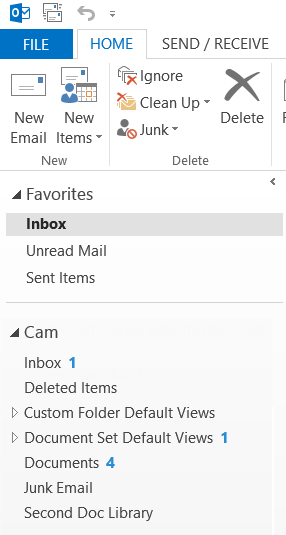
Here’s my Office 365 SharePoint site with multiple document libraries added to the Quick Launch.

This is a screenshot of my desktop Outlook 2013 client displaying those SharePoint document libraries.
LikeLike
We are using SharePoint online and I do not see any of the new site mailbox names showing up within the ‘my site mailboxes’ list after successfully setting up the site mailboxes. I am getting to this by right clicking on my name and selecting “Manage all Site Mailboxes…” I have removed and re-added the site mailbox app several times. Any ideas?
LikeLike
Strange. It does take a little while for them to show up. The visibility of which mailboxes appear is based on your inclusion in the SharePoint sites Members group. If you are getting access to the site via a higher level permission (i.e. Site Collection administrator) this may be the cause. Try adding yourself directly to the site Members list.
LikeLike
Ok thanks, that made a difference in seeing the site mailboxes now if I can just get them to show in Outlook. The site mailboxes are checked to show in Outlook and I have restarted Outlook multiple times but they still don’t show. I do see them in OWA though.
LikeLike
Just to clarify, are these actually each separate document libraries or just a view? If they are views, that would be awesome.
Also, to your point that emails are not actually stored in Sharepoint, why is it that when you try to re-open an email that has been moved to a site mailbox, it actually takes you to sharepoint where you have to download the file, or if you forward, it puts a hyperlink in the body?
LikeLike
jpw – these are different document libraries (not views). The views (columns etc) are not shown in Outlook. You just get the one default view. As to whether the emails are stored in SharePoint or Exchange… You get a “folder” in Outlook called Inbox, this is stored in Exchange, you also get a “folder” in Outlook for each Document library, these are stored in SharePoint. So if you drag/drop an email into the Inbox folder it gets stored in Exchange, if you drag/drop to a Document library folder it gets stored in SharePoint.
Now that some time has passed since Site Mailboxes were introduced I would advise looking at the Groups concept. From what I can see Microsoft is replacing Site Mailboxes with the concept of Groups. A Group brings people together and allows the Group to have a calendar, mailbox, and files. It seems all of Microsoft’s attention is focused on Groups and these replace the functionality offered by Site Mailboxes.
LikeLike
Just an update. I’m not sure if this feature was available in the past. But according to Microsoft, you can not access Sharepoint Lists and Libraries from a SharePoint Mailbox on Outlook.
LikeLike
Not sure of your SharePoint/Outlook situation but I have SharePoint libraries (Office 365/SharePoint 2013) available from within Outlook 2013 (Windows Desktop version). I don’t think the functionality made in to Outlook Web Access and it was only introduced in the 2013 wave of technology (i.e. you needed Outlook 2013, SharePoint 2013, Office 2013). Microsoft is certainly still advertising the feature as current:
https://support.office.com/en-in/article/Overview-Use-a-site-mailbox-to-collaborate-with-your-team-45fb1ef2-19f5-4bf5-b6e2-8f3f77c09221
I’d certainly be interested if Microsoft has published any information saying that they are going to be removing this feature and any timeline associated with this?
LikeLike
Can I setup the SharePoint site Mailbox on my phone?
LikeLike
The actual ‘mailbox’ part of a SharePoint site is stored in Exchange and has is own dedicated Exchange mailbox. Depending on your phone you may be able to connect directly to this mailbox on your Exchange server. I’ve never tried it but there’s a good chance it will work, take a look at this article: http://www.slipstick.com/exchange/view-site-managed-mailboxes-smartphone/
LikeLike
Hi, Cameron, one question, can you drag and drop the email attachment to the documents folder through OWA, instead of Desktop outlook2013?
Regards
Linda
LikeLike
Hi Linda. Although the configuration of which Site Mailboxes you want to see is all done through the OWA interface the Site Mailboxes don’t actually come through in OWA! Strange I know. I expected to see Site Mailboxes appear in OWA in an update to Exchange a long time ago, but it appears we are still waiting….
LikeLike
Great article – I have just started a new job and am spearheading the development of our project tracking and document management in an underutilised O365 sharepoint environment.
I’ve set up a site mailbox to capture all e-mail pertaining to a project, however one _document_ folder is not appearing in the mailbox site in outlook 2013.
Initially 2 of 6 were appearing, altering the link in the quick links menu to have “Forms/AllItems.aspx” at the end made a total of 5 appear, but the last one, despite being set up the same, doesn’t want to appear. The only discernible difference I’ve noticed is that it’s a longer file/link path, but not that much longer than the others.
It will open happily if you click ‘connect to outlook’, but that’s not ideal as we want to make this as easy as possible for people to start using.
Any ideas?
LikeLike
Hi James. Things to check, the library is set to Display on Quick Launch. User is a Site Member (changing security on the library may break this). If you haven’t already I’d also suggest taking look at Groups in Office 365 as I think Microsoft views Groups as a replacement for Site Mailboxes in a lot of ways. Good luck.
LikeLike
It’s baffled us, I’ve set up the same template 3 times now and each time different nested folder folders aren’t displayed. We’ve raised a support ticket so will see what ms say.
LikeLike
So, if you uncheck ‘Use Cached Exchange Mode’ and then let it sync it will repopulate all folders correctly. You can then put it back on again and it seems to be working fine now.
We’re now looking at groups though as one user (who is in an office in the states) decided to delete every item from the shared mailbox as he didn’t know what it was and didn’t want it there. The critical flaw here is that you have no control over the edit permissions.
There are also hundreds of duplicates – do you know the powershell de-duplicate commands? I found them the other day but can’t find them again.
LikeLike
I would definitely recommend looking at Groups rather than Site Mailboxes at this time. I don’t think you will get much love from Microsoft if you go down the Site Mailboxes route.
Are these the PowerShell scripts you were looking for:
https://gallery.technet.microsoft.com/office/Removing-Duplicate-Items-f706e1cc
https://code.msdn.microsoft.com/exchange/PowerShellEWS-Remove-54228d71
LikeLike
Yeah, they’ve pretty much abandoned us on that front. We’ve also had more issues where seemingly random users are associated with a site mailbox and then can’t remove it. A huge security risk that MS said ‘we can’t recreate it but we’ve seen it before’.
Which is encouraging.
LikeLike
I hasten to add that we had to figure this out, MS didn’t know/couldn’t be bothered as site mailboxes are now old news.
LikeLike
Great stuff, thanks for working on this..
LikeLike
Hi Cameron, thanks to your concise posts we have set up store mailboxes for our department within o365. I have just learnt that they’re now to be deprecated! Can you shed any light on this and suggest any alternatives to a SM to collate all mail in an easy comprehensive way?
LikeLike
In Office 365 Microsoft is pushing “Groups” as a replacement to Site Mailboxes. Groups are only available in O365 at the moment and there is not an on-premises equivalent. The idea of a group is that when you create a group in O365, the group gets:
* An Exchange mailbox (with an address that email can be sent to)
* An Exchange Calendar
* A OneNote notebook
* A OneDrive (for Business) location
Groups a user is a member of appear in Outlook which provides navigational access into the different areas of the group listed above.
The Mail component of groups works very similar to Site Mailboxes. As with Site Mailboxes, the mail is still stored in an Exchange Mailbox (not in SharePoint) so you are required to view the groups mail either in Outlook or OWA. Groups (at the moment) give you even less access to SharePoint libraries. You only get the OneDrive location for the group. You can’t expose other SharePoint libraries into Outlook.
It seems Microsoft have taken a step back from the Site Mailboxes approach (which was aimed at bringing together just Mail and SharePoint documents), and have gone with the broader goal of Groups which are aimed at bringing together data stored in (eventually) any of the Office 365 services (e.g. Mail, Calendar, Contacts, OneDrive, SharePoint, Conversations….). Fundamentally I agree with their vision, at the moment though the SharePoint integration is very limited (even a step back from Site Mailboxes), and it still remains to be seen how the Groups model can be translated to an on-prem solution. If you have scope to look into 3rd party products I’d suggest you take a look at OnePlaceMail (which I’m involved with). The big difference with OnePlaceMail is that the vision is that email should be stored in SharePoint rather than in Exchange. This immediately gets all your documents and email into one place where they can then become part of a system you build on SharePoint. While you have half the story (Mail) in Exhange and the other half in SharePoint (documents) it’s going to be a struggle until Microsoft provide a much better integration across these 2 services. I hope this helps, good luck.
LikeLiked by 1 person
Is site Mailbox able to function cross sites?
https://social.technet.microsoft.com/Forums/en-US/c2d9e2e9-e6d1-4a4d-9c57-00e2f2e354ef/site-mailbox-error?forum=exchangesvradmin
LikeLike
Hi, I haven’t had experience setting up Exchange Site Mailboxes under the scenario described in the link so not sure if it is a support scenario or not.
LikeLike
I left this comment on another site as it was in line with the narrative, but I thought I’d copy it here for your thoughts on our application:
———————————————————————————————-
We have been using Team Sites for the past few years for all our projects which has worked OK, though the adoption and buy-in has been a real struggle.
We have recently implemented Site Mailboxes as a method to prevent siloing of information and e-mails, however this feature is now no longer supported by microsoft (and has a couple of bugs that are worrying/security related). This is a pain and we are now shutting these down.
We need to lower the barrier to entry (increase adoption and buy in with a path of least resistance) and introduce a method of decreasing the noise generated by split and diverging e-mail threads to collaborate more effectively. We’ve a large organisation and this is a common problem.
The only suggestions we’ve had to move on from this, whilst still continuing with Team Sites (there’s no way we’ll be moving away from this – and they’re set up pretty swiftly), have been:
> Use Yammer – No, our entire office see this as Facebook for work and don’t use it in our region
> Use Hipchat – I would rather keep within the O365 ecosystem as we have a broad range of users who don’t like change. With the similarities to Groups there’s a hesitancy to look at this or Slack as a simpler alternative, and we can’t see the benefit with these.
> Use Groups – I don’t know enough about them (though your article was very useful) and their isolation from Sites is a concern.
In short, I feel that MS are really missing the point here, they’re providing a bunch of seemingly independent tools (though as you say they are leveraging the power of the back-end of exchange/sharepoint etc.) where you can cherry pick what you want for a specific purpose. However what we want (and I can’t see us being alone here) is a tool to do the following:
a) Effectively manage a project & its documents (Team Sites; Sharepoint)
b) Whilst capturing all e-mail pertaining to that project (Site Mailboxes; Exchange)
c) Reduce noise within project communications (Groups; Sharepoint/Exchange)
d) Target/tag discussions/topics/people easily (Yammer; or any of the many collab tools out there).
The tools/functionality are there (I mean, literally, they’re all there IN O365!) but they’re so isolated from one another it makes implementing them prohibitive.
Do you have any suggestions?
————————————————————————————————-
Whilst I see the benefits of the individual ‘apps’ within the O365 offering, I’m really struggling to see the point of them all being there when they’re all so dissonant and there’s absolutely no coherence between the offering as a whole.
LikeLiked by 1 person
Thanks for copying this message explaining your situation, what you are trying to achieve and what you have been considering. I have to say that I agree with you on all points raised! All the tools necessary are present in Office 365 but they just don’t work nicely together and still keep data isolated in silos (e.g. Mail in Exchange, Documents in SharePoint). At the moment it requires custom development work (or 3rd party tools)to improve the situation. Microsoft is expected to be announcing the new look Team sites and future of SharePoint in early May. This may bring some joy (fingers crossed).
Unfortunately I can’t offer you too much out-of-the-box with Office 365 that going to solve your needs. I do certainly spend a lot of time working on products to solve these exact problems. This link probably gives you the best rundown on what’s possible in a project centric scenario where you are really trying to remove the clutter and drive the right project areas in SharePoint to the right people in the business and get much better integration between Email and Documents. Let me know what you think.
Read this overview of OnePlace Live Solution Profiles first:
http://www.oneplacesolutions.com/news/oneplacelive-scenarios-unleashed-introduction.html
Then read this on applying Solution Profiles to a Project Management system built in SharePoint
http://www.oneplacesolutions.com/news/oneplacelive-scenarios-unleashed-project-management.html
Hopefully that gives you some ideas on what’s possible and how you could achieve some of your goals.
LikeLike
Hi Cameron,
Just a quick question,
Let’s suppose the site mailbox receives either external/internal email including attachments? where do the attachments stores?
Exchange or SharePoint? I can’t find this scenario so far.
Thank you so much!
LikeLike
Hi Ralo. The attachments remain on the email and are stored in Exchange. This is same same behaviour for internal or external mail.
LikeLike